

Enhanced Mobile Menu
What You'll Create
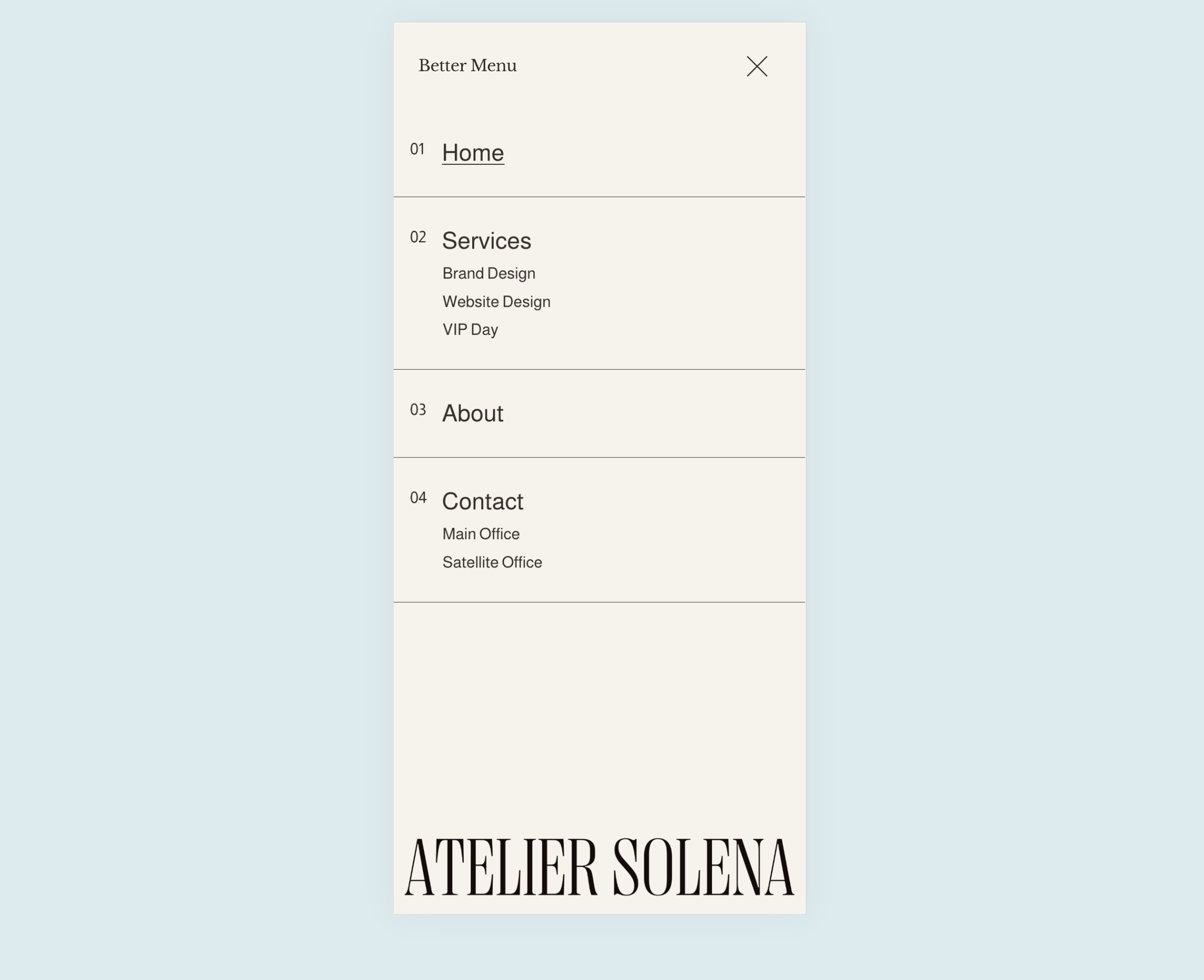
An enhanced mobile menu with better organization - folder items nested properly under their parent links, numbered counters for visual hierarchy, customizable font sizes, and decorative elements. The menu is more intuitive and visually polished than Squarespace's default.
The Problem It Solves
Squarespace's default mobile menu can feel disorganized, especially with folder navigation. Items appear flat without clear hierarchy, and customization options are limited. This technique restructures the menu with JavaScript and enhances it with CSS for a premium mobile experience.
Perfect For
Any site wanting polished mobile navigation, Restaurants with menu categories, Service businesses with organized offerings, Multi-page sites with complex navigation.
What Makes This Different
JavaScript reorganizes folder items to nest under their parent links properly. CSS adds numbered counters, custom font sizing for hierarchy, border separators, and optional decorative elements. The result is mobile navigation that feels custom-designed rather than template-based.
Details
Code Type: CSS + JavaScript
Prerequisites: None - works with default navigation
Toolkit Title: Better Mobile Menu
Learn This Technique
This is one of 150+ code techniques taught inside Standout Squarespace, where you get:
The complete, copy-paste code
Video walkthrough explaining how it works
The principles behind the technique so you can customize it
Access to our private community for support