

Polaroid Style Carousel Cards
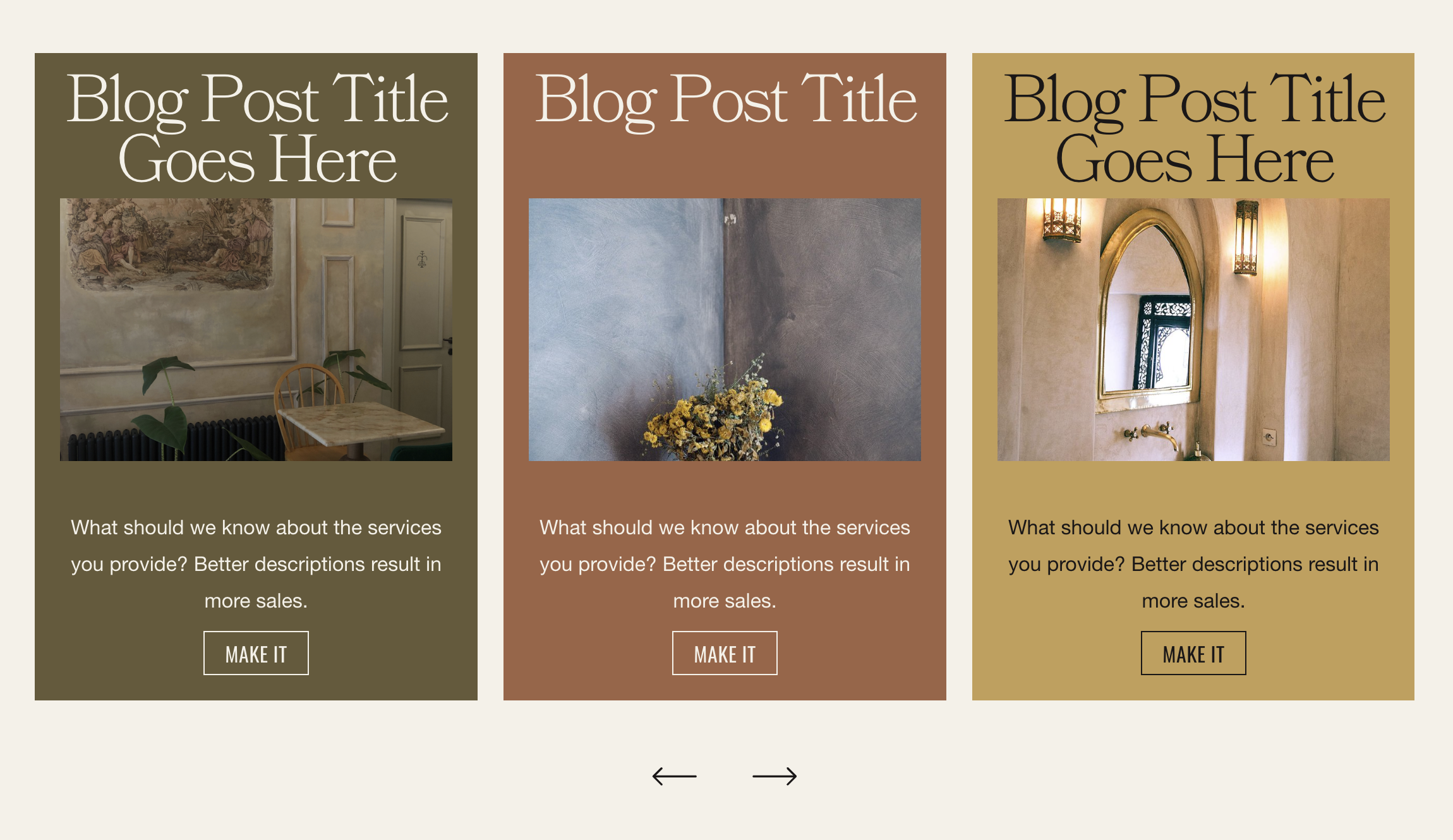
What You'll Create
Polaroid-style carousel cards where images appear at the bottom like instant photos, with titles stacked above. Cards can have different background colors based on image alt text tags, creating a playful, varied aesthetic.
The Problem It Solves
Standard carousel layouts place images on top or side, but the classic polaroid look - white border frame with photo at bottom and text above - requires restructuring the default element order and adding conditional color styling.
Perfect For
Photo galleries, Memory walls, Team showcases, Event highlights, Creative portfolios.
What Makes This Different
Flexible layout reorders the carousel item elements so titles appear above images. The technique uses alt text keywords (like 'in green card' or 'in dark card') to conditionally apply different background colors, letting you create varied, colorful card sets from a single carousel. Style variables handle text and button colors for proper contrast on each card variant.
Details
Section Type: Fluid & Classic
Code Type: CSS
Prerequisites: List Section set to Carousel, Space below title value 23
Toolkit Title: List Item Polaroids
Learn This Technique
This is one of 150+ code techniques taught inside Standout Squarespace, where you get:
The complete, copy-paste code
Video walkthrough explaining how it works
The principles behind the technique so you can customize it
Access to our private community for support